

TL;DR: Consently is certified for Google Consent Mode v2 and IAB TCF 2.3, meaning Google and relevant industry bodies have verified the platform meets technical standards for consent signal passing and handling programmatic advertising signals effectively.
Overview
Third-party certifications validate that Consently correctly implements consent frameworks used by Google Analytics, Google Ads, and programmatic advertising platforms. These certifications ensure consent signals pass properly from your banner to advertising technologies, maintaining measurement accuracy while respecting visitor privacy choices.
Google Consent Mode v2 Certification
What It Is
Google Consent Mode v2 is a technical framework that allows Google Analytics and Google Ads to operate in a privacy-preserving manner when visitors reject cookies. Instead of losing all measurement capability, Google uses conversion modeling to estimate aggregate trends while respecting individual opt-outs.
Consently is a Google-certified CMP for Additional Consent (AC v2) and supports Google Consent Mode v2 alongside IAB TCF v2.3.
Our implementation follows Google’s documented guidelines for consent signaling, ensuring Google tags receive accurate consent states only after user choice.
This helps publishers support measurement accuracy while aligning their consent implementation with user consent preferences.
Google CMP Partner listing is pending approval. Current certification applies to Additional Consent (AC v2).
Benefits for Your Website
Maintained Measurement: When visitors reject analytics cookies, Google Analytics switches to cookieless measurement using modeling. You retain directional insights into traffic and conversions, avoiding complete data loss.
Ad Performance Preservation: Google Ads can continue measuring conversions and optimizing campaigns using aggregated, modeled data even when visitors opt out of ad cookies. This preserves campaign effectiveness while respecting privacy choices.
Compliance Without Setup: Consently automatically configures Google Consent Mode when you enable the banner—no manual tag modifications or developer work required.
Verification
To confirm Google Consent Mode is working:
Install the Google Tag Assistant Chrome extension
Visit your website and open Tag Assistant
Look for Consent Mode signals showing consent states for each category
Change consent preferences and verify signals update immediately
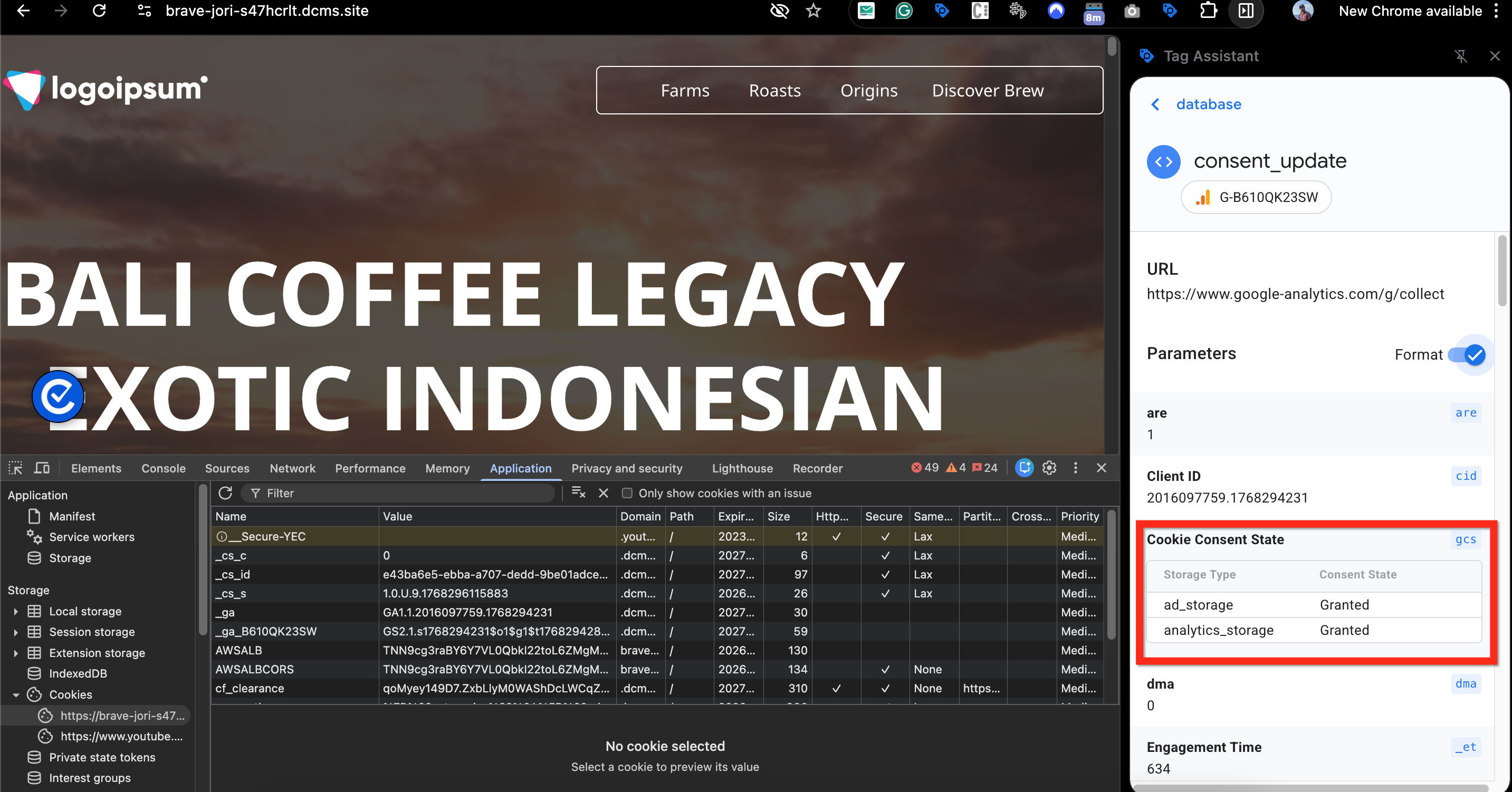
This displays the consent signals Consently is sending to Google.
IAB TCF 2.3 Certification
What It Is
The IAB (Interactive Advertising Bureau) Transparency & Consent Framework (TCF) is an industry-standard protocol for passing consent signals to hundreds of advertising vendors in programmatic advertising. Publishers, advertisers, and ad tech companies use TCF to support standardized GDPR consent signaling in automated ad buying.
Consently's IAB TCF 2.3 certification means the platform:
Generates valid TC Strings (consent signal format)
Integrates with the IAB's Global Vendor List
Supports the IAB's purpose and special feature declarations
Passes publisher restrictions correctly
Benefits for Publishers
Programmatic Ad Revenue: If your website displays programmatic advertising (ad networks that automatically buy and sell ad space), IAB TCF implementation is often used by participating ad vendors. Without it, many ad vendors cannot bid on your inventory, reducing revenue.
Vendor Compliance: The IAB TCF Settings allow you to enable specific purposes (e.g., personalized ads) and vendors (e.g., Google, Amazon Advertising). The framework ensures that all participating vendors properly receive and honor consent signals.
Legal Protection: TCF provides a standardized approach to GDPR consent in advertising. When all parties follow the framework, roles and responsibilities related to consent signaling are clearly defined between publishers, vendors, and technology providers.
How to Enable IAB TCF
Navigate to Cookie Banner → General → IAB TCF Settings and select one of these options:
Custom Configuration: Manually enable individual purposes, vendors, and features to control exactly what appears in your banner's preference center.
Support IAB TCF v2 and Google Consent Mode (Preset): Automatically enables the most common settings:
Purpose List: ON
Google Vendor: ON
TCF Vendor List: ON
Decline button: ON
Preferences Button: ON
💡 Tip: The preset configuration works for most publishers. Only use custom configuration if you need to restrict specific vendors or purposes.
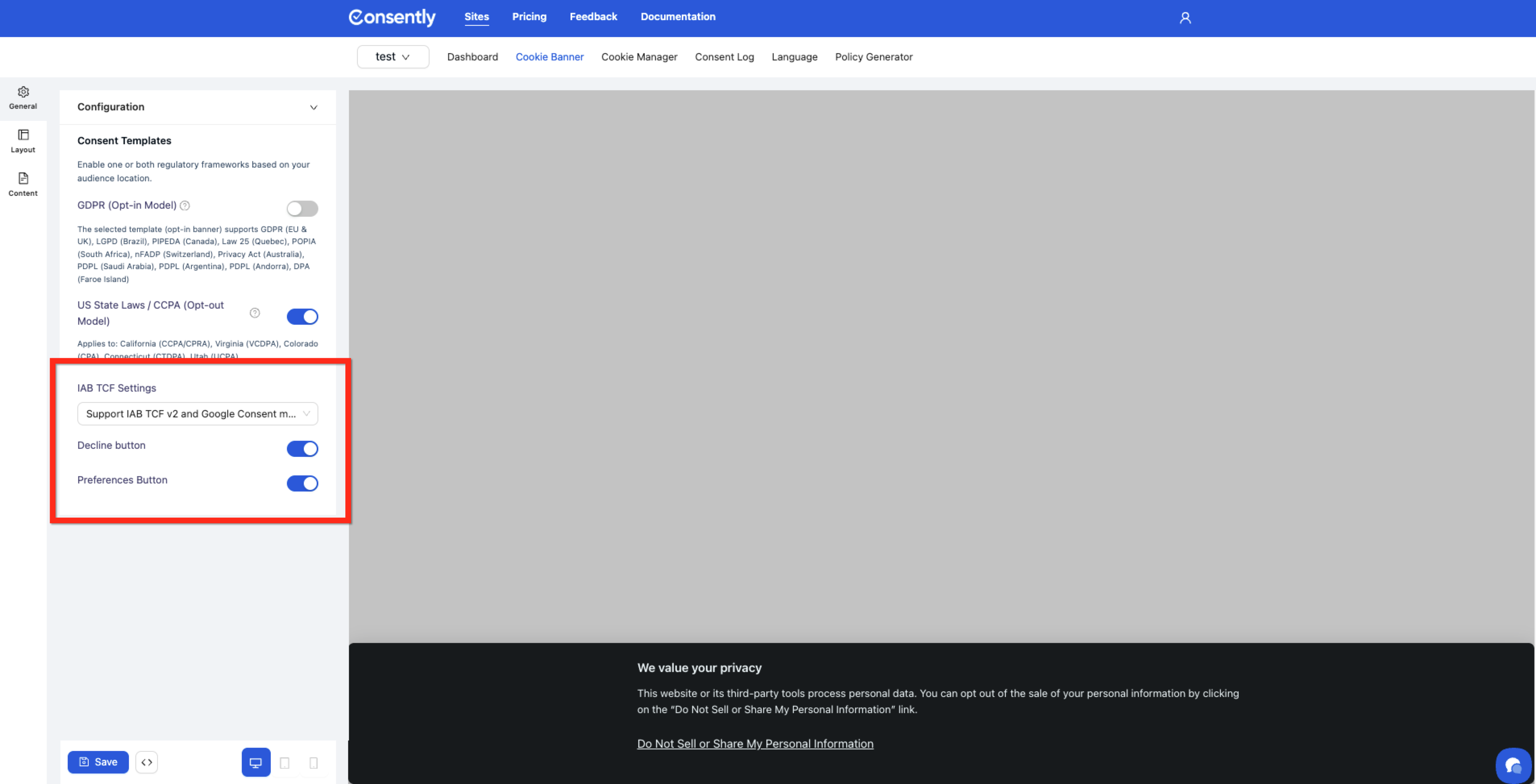
For detailed configuration guidance, see IAB TCF Settings.
Verification
To confirm that IAB TCF is working correctly, follow these steps:
Open your website with the cookie banner enabled.
Open Developer Tools (F12) → go to the Console tab.
Run the following JavaScript to check the consent status:
__tcfapi('getTCData', 2, function(tcData, success) {
  console.log('Success:', success);
  console.log('TC String:', tcData?.tcString);
});
What to expect:
Before interacting with the banner (no action yet),
successshould betrueandtcStringmay be empty.After clicking Accept or Reject,
successremainstrueandtcStringwill show a valid ID representing the consent choices.
You can then decode this TC string at iabtcf.com decoder to see exactly which purposes and vendors the user consented to.

Alternatively, click Manage Preferences in your banner and verify that the vendor list and purpose list display correctly under the consent options.
What Certifications Don't Mean
These certifications validate technical implementation, but they don't:
Replace Legal Compliance: Certifications confirm Consently sends signals correctly—they don't guarantee your overall GDPR or CCPA compliance. You must still categorize cookies accurately, write honest policies, and honor visitor rights.
Eliminate All Measurement Loss: Google's modeling improves measurement when visitors opt out, but it's not as accurate as direct tracking. Expect some data degradation with high opt-out rates.
Cover All Advertising Vendors: IAB TCF only includes vendors who participate in the framework. Some ad networks operate outside TCF and use separate consent mechanisms.
Guarantee Ad Revenue While TCF compliance prevents revenue loss from technical consent failures, actual revenue depends on ad demand, content quality, and visitor consent rates.
Ongoing Validity
Both certifications remain valid as long as:
You maintain an active Consently subscription
You don't modify the Consently script or consent signals
Google and IAB don't change their technical guidelines (Consently updates automatically when standards evolve)
Consently handles recertification and framework updates automatically—you don't need to take any action when Google or IAB releases new versions.
What's Next
Now that you understand Consently's certifications, you should:
Configure IAB TCF Settings if you run programmatic advertising
Review your Consent Analytics to track how certifications affect measurement
Related Topics
IAB TCF Consent Tracking — How TCF consent data is logged
Cookie Auto-Blocking — How consent enforcement works with certified frameworks